Switching guide
📦Switch from Jersey Watch to Simple Standings
Jersey Watch documents no standings or schedule export yet. How to copy your standings and schedule off your Jersey Watch site and into Simple Standings, and what to keep on Jersey Watch.
By The Simple Standings team · Updated November 8, 2026 · Facts about other products checked November 8, 2026
Before you start
- There is no standings export to run. Jersey Watch’s help centre documents none, and its schedule download (PDF, Excel, CSV) is marked “Coming soon”.
- Your standings are a table on your public site, one per division. Copy each one.
- Registrations do export (spreadsheet or PDF, from Online Registration), if you are moving those somewhere else.
- You may not need to leave. Much of what Jersey Watch does, Simple Standings does not: see what you give up below.
What comes across, and what does not
We do not have an account on it, so its steps below are what its own help centre says, linked under Sources. The Simple Standings steps were run on a local build.
- Standings: team names, wins, losses and differential, per division. Make one Simple Standings league per division; duplicating the first copies its columns and look.
- Schedule: whatever your public schedule page shows (date, time, teams, location), copied as a table.
- Not coming across: your website pages, registration forms, payments and contact lists. Those stay on Jersey Watch or move to another tool.
Step by step
Moving a Jersey Watch league, step by step
- 01
Copy the standings from your Jersey Watch site
Open the standings on your public Jersey Watch site, pick the division, select the table and copy it. A browser copies a web table as tab-separated rows, which is what the import reads. Repeat for each division.
- 02
Copy the schedule, if you want it
Schedule export is not available yet, so copy the schedule table from your public site the same way, or skip it: Simple Standings does not need a schedule for standings.
- 03
Create the league in Simple Standings
Start a free league and pick your sport, so the standings columns come prefilled. You can import at this step, or later from the editor.
- 04
Open Import from a spreadsheet
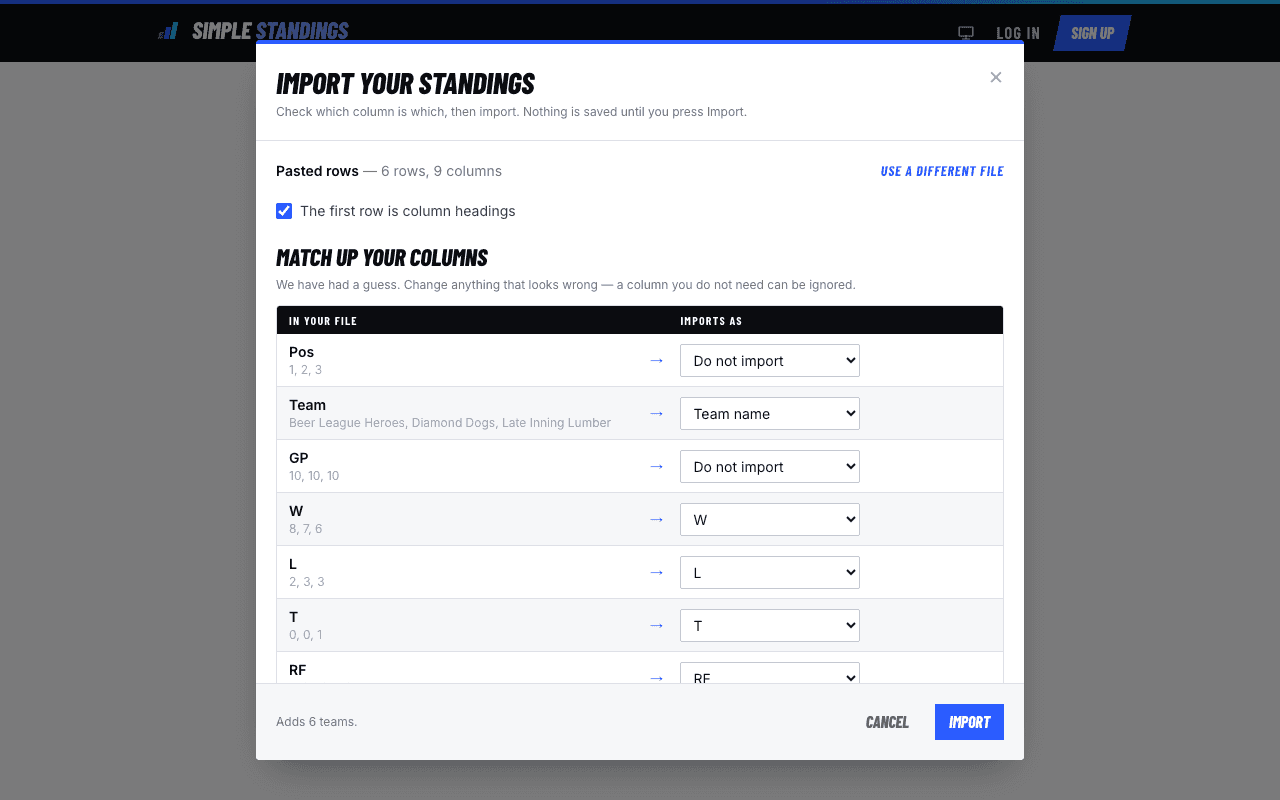
Each table (standings, schedule, statistics) has an Import from a spreadsheet button. Drop in a CSV, TSV or Excel file, or choose paste rows straight from your spreadsheet and paste the rows you copied.
- 05
Match the columns
Tick The first row is column headings if it is. For each column, choose what it imports as: an existing column, the team name, Add as a new column, or Do not import. Nothing is saved until you press Import.
- 06
Share the new link
Copy the league’s link or print its QR code, and send it where the old one went: the group chat, the league email, the venue’s notice board.
When to stay on Jersey Watch
- You need a league website with your own domain.
- Registration and payments run through it.
- You send announcements to families from it.
- You are happy with generator-built schedules and just want them to keep working.
What you give up by switching
- The website, the custom domain, registration and payments.
- Announcements and contact lists.
- Pages with no ads at all, unless you pay $9.99 once per league.
- Someone to set it up for you.
Questions
Frequently asked
- Can I export standings from Jersey Watch?
- Not that its help centre documents. Registrants export to a spreadsheet or PDF and rosters to PDF; schedule export is marked “Coming soon”. Copying the standings table from your public site works today.
- Do I have to cancel Jersey Watch to use Simple Standings?
- No. You can keep the website and registration on Jersey Watch and link to a Simple Standings page for the table or for player stats.
- How do I handle several divisions?
- Create one Simple Standings league per division. Set up the first, then duplicate it for the others so the columns and colours carry over.
Sources, checked November 8, 2026
- Jersey Watch help: How to manage standings
- Jersey Watch schedule generator page (export marked "Coming soon")
- Jersey Watch help: Exporting player information
- Jersey Watch help: Creating schedules and events
- Why Jersey Watch
Product names belong to their owners. Simple Standings is not affiliated with any product compared here. Spot something out of date? Tell us and we will fix it.
Bring your table across
Copy it, paste it, match the columns, share the link. Free.